Research Center / TradingView Tactics

5 TradingView Tips Every Free User Must Know

Most traders on TradingView’s free plan hit the same wall pretty fast. You want to stack five indicators, watch a hundred tickers, or pull historical data that the platform seems to be hiding from you and suddenly you’re staring at a paywall. But here’s the thing: a lot of those limits have workarounds, and they’re not even that complicated once you know them.
We put together five tips that we use ourselves inside the Foxian Trading community. Some are pure TradingView tricks, some involve a bit of Pine Script, and one of them is going to change how you do chart research entirely. Let’s get into it.
By Foxian Research
March 2026
TradingView / Free Plan Hacks
5 Practical Workarounds
By Foxian Research
5
Free-plan fixes
11 min
Approximate read
2026
Current workflow
What This Article Covers
Indicator stacking, Pine Script combining, watchlist overflow storage, custom formulas for historical data, and cleaner chart reading with line mode and symbol overlays.
Most traders on TradingView’s free plan hit the same wall pretty fast. You want to stack five indicators, watch a hundred tickers, or pull historical data that the platform seems to be hiding from you and suddenly you’re staring at a paywall. But here’s the thing: a lot of those limits have workarounds, and they’re not even that complicated once you know them. We put together five tips that we use ourselves inside the Foxian Trading community. Some are pure TradingView tricks, some involve a bit of Pine Script, and one of them is going to change how you do chart research entirely.
01
Indicator Capacity

Add More Than 2-3 Indicators Without Losing Your Setup

TradingView only counts the indicators that are currently visible and active on your chart.
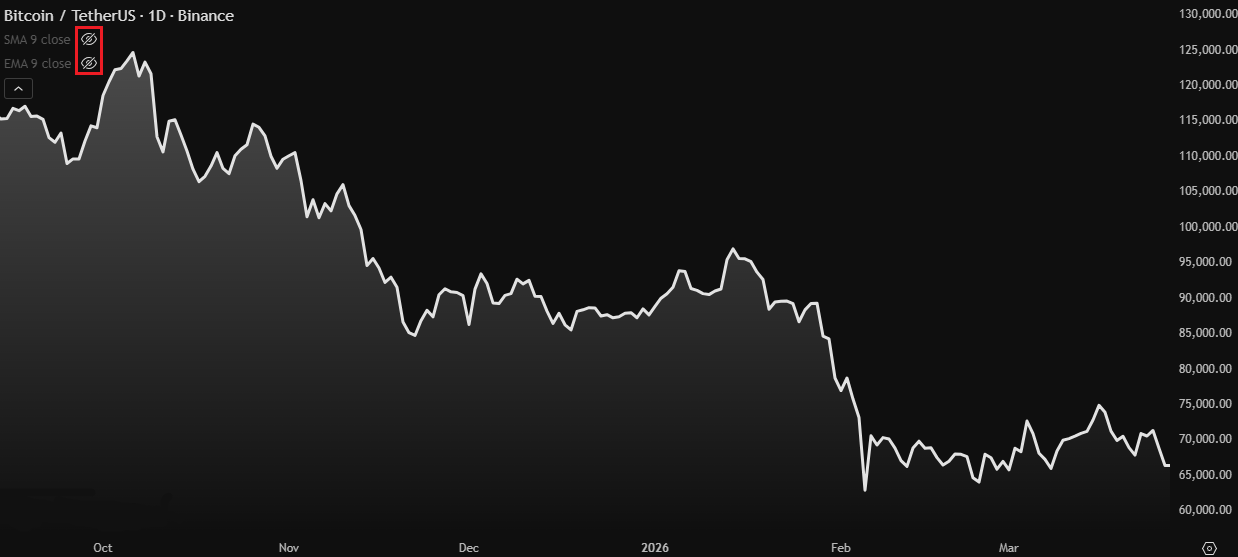
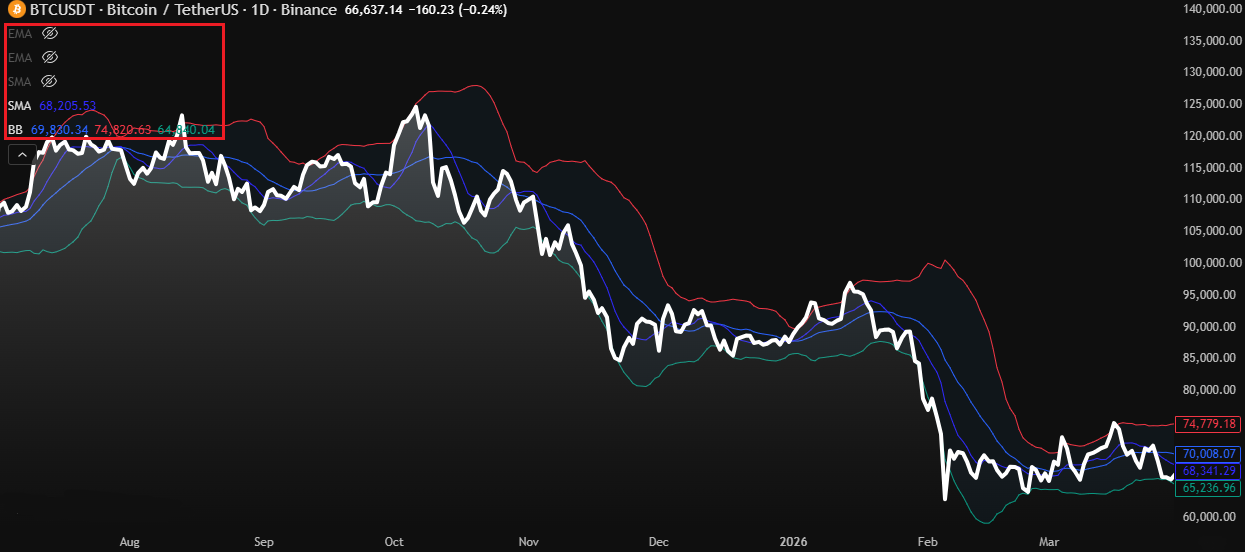
The free plan officially limits you to 3 active indicators on a single chart. That stings when you’re running a strategy that needs RSI, MACD, volume, and a few moving averages all at once. But there’s a dead-simple workaround that most people don’t realise: TradingView only counts the indicators that are currently visible and active on your chart.
If you want to add a new indicator but you’re already at the limit, just hide the ones you don’t need right now. Not delete, just turn them off. Then add your new indicator. TradingView won’t stop you, and you can toggle your hidden indicators back on any time.
How To Use It
  1. Open the chart and look to the indicator list in the top-left corner.
  2. Click the eye icon beside the studies you do not need right now.
  3. Leave them hidden rather than deleting them from the chart.
  4. Add the next indicator from the toolbar and continue working.
  5. Toggle the hidden studies back on whenever that layer of analysis matters again.
Foxian Read
This works because the hidden studies stay in the setup without counting against the active limit.
Hide indicators with the eye icon instead of deleting them.
A fuller chart stack can still live on one free-plan workspace.
02
Pine Script Workflow

Combine Open-Source Indicators Into One Script

If you need two indicators running simultaneously and you’re already at your limit, you can merge them into a single script.
This one’s a bit more involved but genuinely powerful. TradingView’s Pine Script lets you take the code from one indicator and paste it into another, and suddenly they both run as one. Yes, this works on the free plan, and you do not need to be a developer to do the basic version of it.
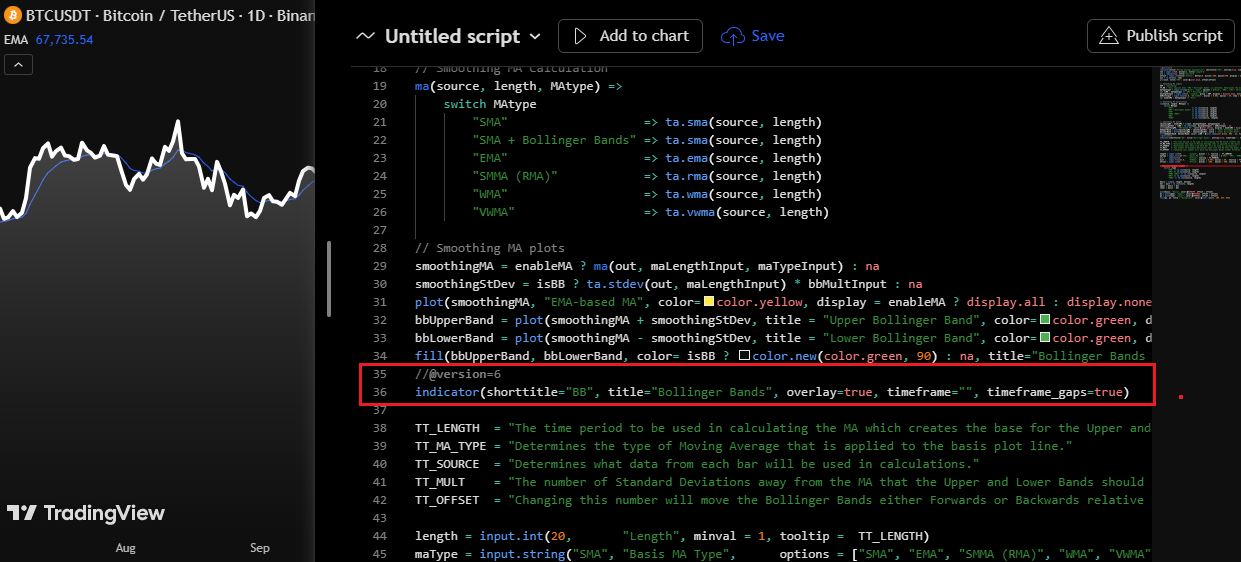
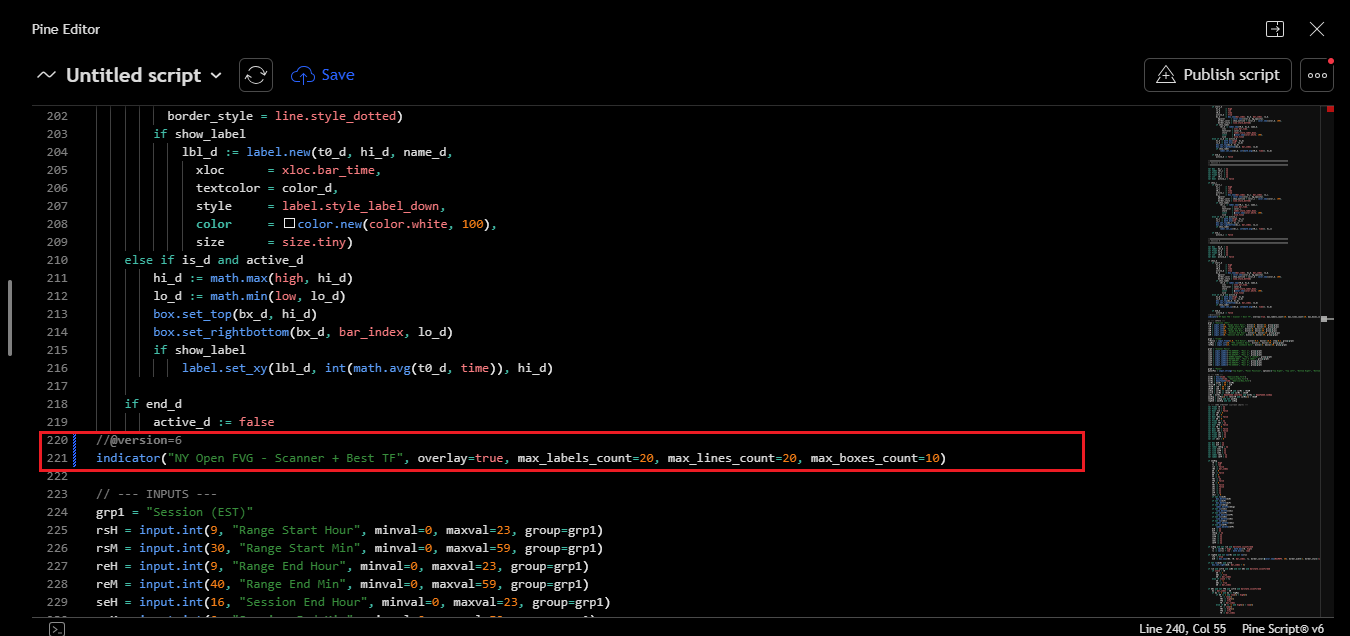
As long as the indicators use public, visible source code, you can copy and combine them. Open both scripts, copy the relevant plotting logic from the second one, and paste it into the first. The important part is that there should only be one version() or study() declaration at the top of the whole script.
Not all indicators are open-source, and some use variables or inputs with the same names, so you may need to rename them to avoid conflicts. But when it works, it is one of the cleanest ways to do more with a free plan.
How To Use It
  1. Open Indicator A and Indicator B only if their source code is public.
  2. Use the three-dot menu and choose Edit Source Code.
  3. Copy the relevant plots, calculations, and inputs from the second script.
  4. Paste them into the first script and remove the duplicate version or indicator declaration.
  5. Rename overlapping variables where necessary, then save the merged script.
Foxian Read
Protected scripts cannot be merged this way. This method only works with indicators whose source code is visible.
Remove the duplicate declaration line so the merged script compiles correctly.
A second script can be folded into the same editor when its source is public.
03
Watchlist Storage

Use Deleted Symbols as a Shadow Watchlist

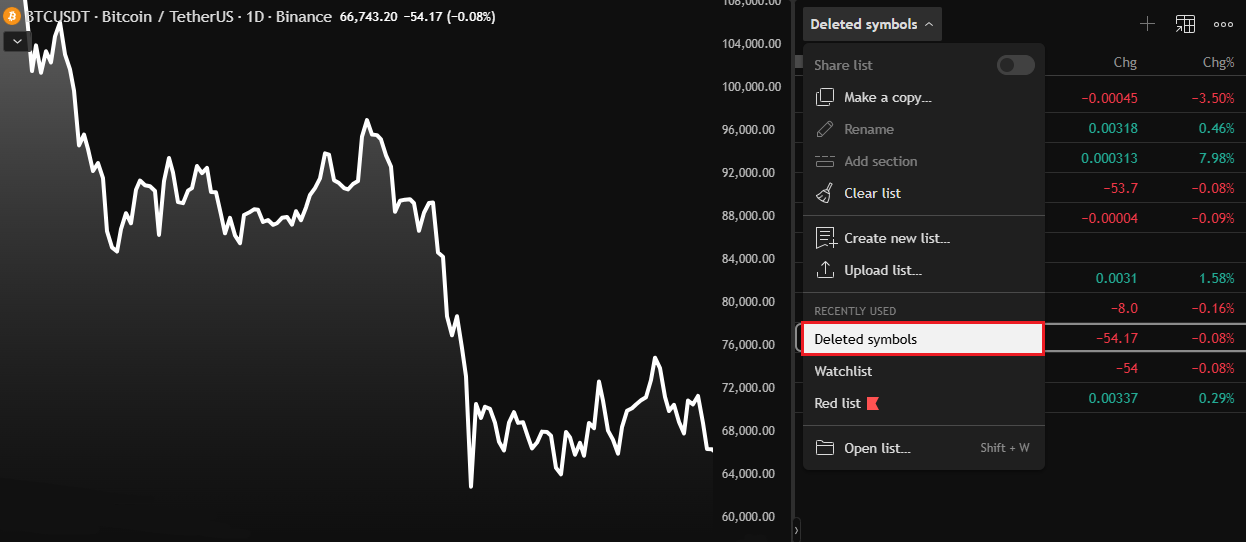
TradingView’s Deleted Symbols section can be used as hidden watchlist storage.
Free TradingView accounts cap your main watchlist at 100 symbols. If you’re tracking altcoins, forex pairs, commodities, and stocks at the same time, you’ll hit that ceiling fast. The trick is that TradingView has a “Deleted Symbols” section in every watchlist that doesn’t count toward your active limit.
You can use that section as hidden storage. Think of Deleted Symbols as a second watchlist that lives behind the scenes: an active list for what you’re watching today and a deleted list for everything else.
How To Use It
  1. Add the symbols you want to keep in circulation to the main watchlist first.
  2. Delete the names you do not need on the active board today.
  3. Open the watchlist name menu and switch to Deleted Symbols.
  4. Use that hidden list as storage and restore names back to the main board when needed.
Foxian Read
Delete from the main list to store the symbol, then restore it later when it comes back into focus.
Deleted Symbols can hold overflow names without cluttering the active list.
04
Historical Context

Rebuild Limited Tickers With Custom Formulas

If a native ticker has limited history, use a custom formula to reconstruct it from components with deeper data.
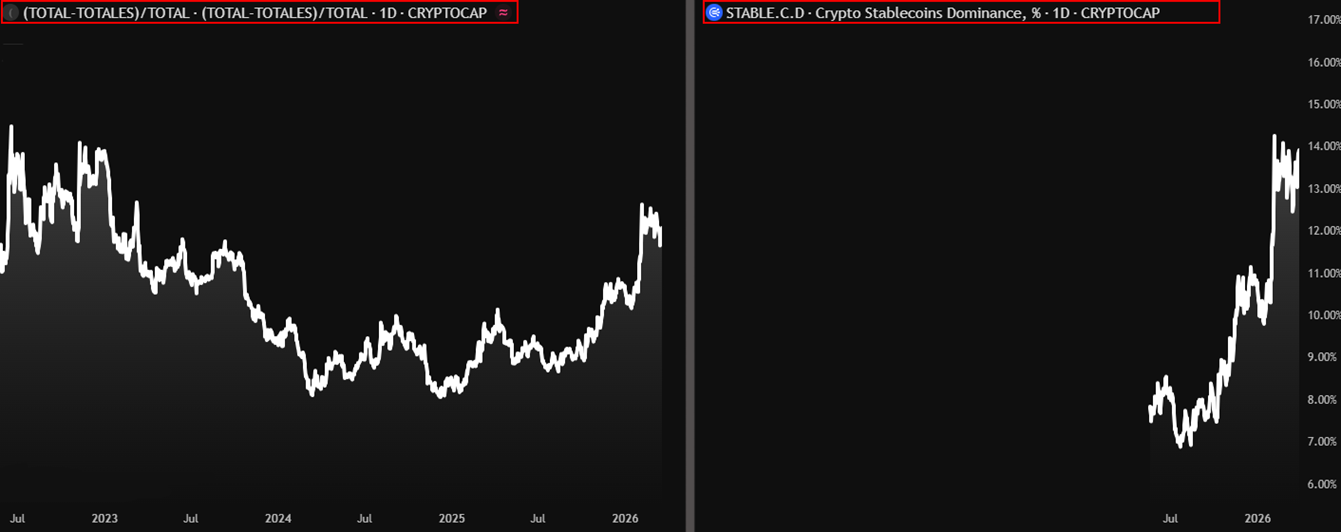
Some tickers on TradingView only have data going back to when they were listed, which makes drawing meaningful support, resistance, or trend lines almost impossible. A classic example is STABLE.D. If you pull that ticker right now, the data only goes back to mid-2025, so it can look like it’s sitting at all-time highs without any real context.
The fix is to use a custom formula in the TradingView search bar instead of the native ticker. TradingView lets you enter mathematical expressions directly, and if the underlying data exists for the components, you can reconstruct a metric that goes back much further.
For stablecoin dominance, type `(CRYPTOCAP:TOTAL – CRYPTOCAP:TOTALES) / CRYPTOCAP:TOTAL`. TOTAL is total crypto market cap and TOTALES is total market cap excluding stablecoins. The math is simple: total minus non-stable, divided by total, gives you stablecoin dominance.
How To Use It
  1. Open TradingView symbol search instead of loading the native ticker directly.
  2. Paste the formula `(CRYPTOCAP:TOTAL – CRYPTOCAP:TOTALES) / CRYPTOCAP:TOTAL`.
  3. Load the formula as the active series and inspect the expanded history.
  4. Use the same approach for other sector and dominance metrics when native tickers are too new.
Foxian Read
Now you have real historical context instead of relying on a native ticker with a short data window.

The reconstructed series restores historical context that the native ticker does not show.
05
Chart Clarity

Use Line Charts and Overlay Layouts to Read Structure Faster

Two underused free features available on the free plan are line charts and symbol overlays.
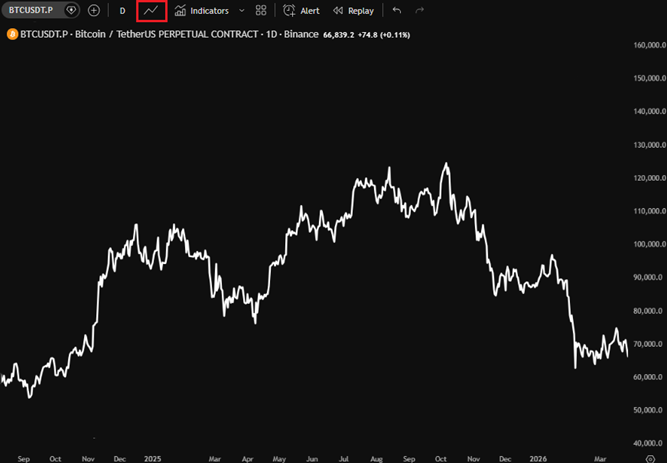
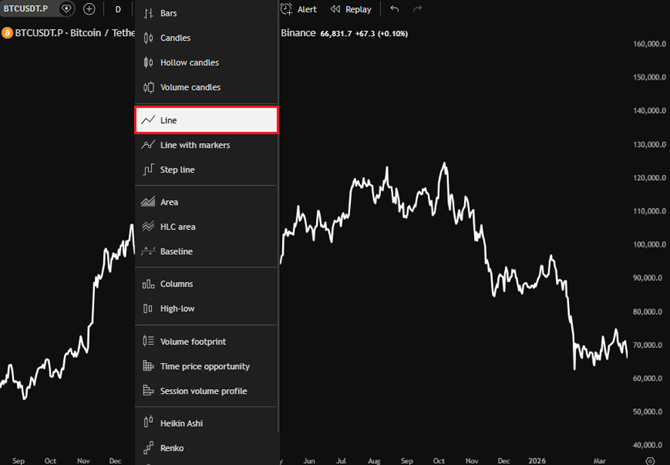
Candlestick charts are great for most trading, but line charts are cleaner for spotting macro structure, clean trend lines, and long-term support or resistance without the noise of wicks and bodies. To switch to a line chart, click the candlestick icon in the top toolbar and select Line from the dropdown.
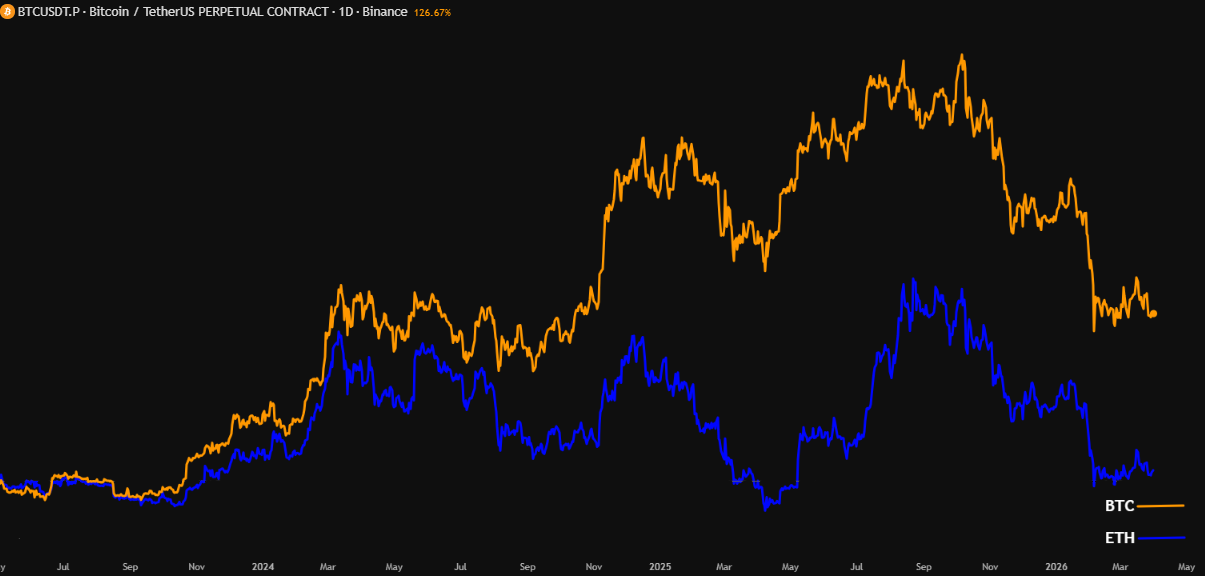
TradingView also lets you overlay as many symbols as you want on a single chart. Click the plus icon right next to your current symbol name, search for the ticker or formula you want to add, and hit Enter. It will appear as an overlaid line on your existing chart, which makes relationships much easier to spot than when you flip between separate tabs.
How To Use It
  1. Click the chart-style button near the symbol and timeframe controls.
  2. Choose Line whenever you want cleaner macro structure.
  3. Use the plus icon beside the active symbol to add overlays.
  4. Stack related series on one chart so the relationship becomes visible immediately.
Foxian Read
Stablecoin dominance on top of TOTAL, or BTC against ETH on the same chart, often reveals relationships you miss when switching tabs.
The line-chart toggle sits directly in the main toolbar.
Switching from candlesticks to line mode removes unnecessary noise.
Overlay charts reveal relative strength relationships that are hard to spot tab by tab.
Final Thoughts

TradingView's free plan is genuinely capable if you know how to work around its limits.

None of these tips require a paid upgrade, just a bit of know-how. The indicator stacking trick, the Pine Script merge method, the deleted tickers workaround, custom formula tickers for historical data, and the built-in multi-chart layouts are all sitting right there waiting to be used. If you found these useful and want to go deeper, whether it’s more custom formulas, combined indicator scripts, or just a community of traders who share this kind of stuff daily, come join us in the Foxian Trading Discord.
Exclusive indicators and combined scripts
Custom ticker formulas on request
Smart money tracking tools and dynamic levels
By Foxian Research

Get exclusive indicators, custom ticker formulas, Smart Money Tracking tools, and Support & Resistance Dynamic Levels.

Everything is built for traders who want an edge without paying for extra TradingView plans.